
How to Make Direct Sales Easy on Your Existing Website
On this page
How to Make Direct Sales Easy on Your Existing Website
Use Curios to handle checkout, payments, delivery, fulfillment, taxes, and customer support behind the scenes of your own website.
Keep 100% of your sales
You keep 100% of every sale made through your website.
Own your IP
Your books, your prices, your rules. You stay in full control of your work.
Get every customer email
You get the contact details of everyone who buys, so you can reach them again.
If you have an existing website, this is how you can use Curios to handle the admin. You set up your site, and Curios handles the rest behind the scenes: checkout, payments, delivery, fulfillment, taxes and customer support. Curios is the merchant of record, so we collect and file the taxes on every sale.
The outcome: a highly customizable store with none of the common direct sales hassles.
1Upload your content to Curios
First, add the book you want to sell. Every format you upload gets its own checkout link.
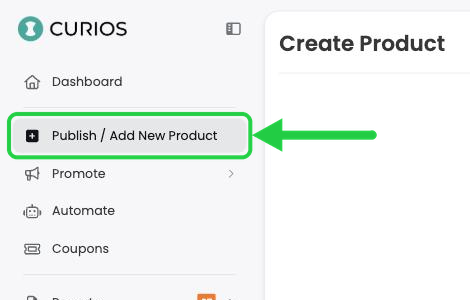
- Log in at studio.curios.com and click Publish / Add New Product.
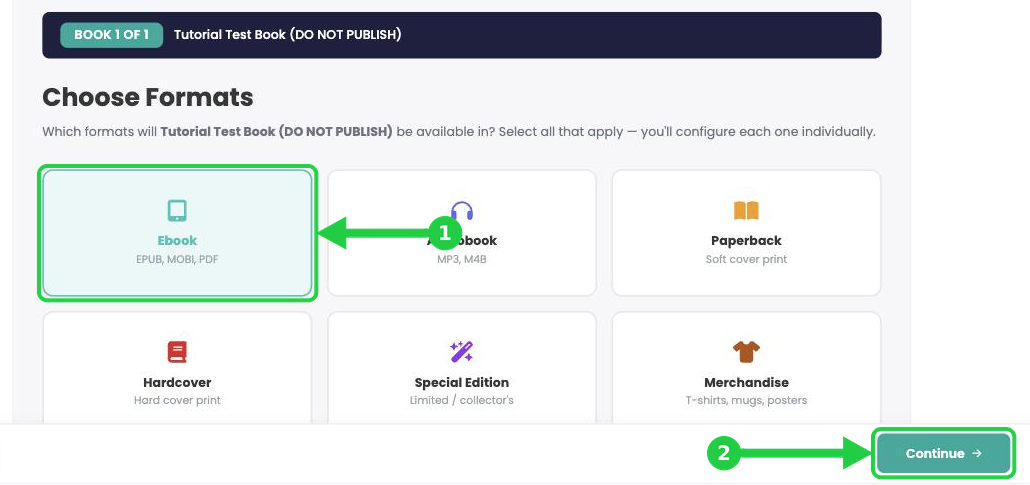
- Click Book, set up your series information and book details, then choose the formats you want to sell (ebook, audiobook, paperback, hardcover, special edition, merchandise or a combo pack).
- Fill in each format, then click Publish on the review page (or Publish Project on the product page).
Step-by-step guides: Every format has its own tutorial, starting with Upload and Sell Your Ebook. To set up several books and formats at once, see Upload a Multi-Format Book Series.
Publish before you share: Your checkout link only works once the product is published. A link to an unpublished product shows No tokens available instead of the checkout.
2Find your direct checkout links
Curios gives you two kinds of link for each product:
- Direct checkout link (curios.com/buy/…): goes straight to the Curios checkout page. This is the one for your own website or landing page.
- Marketplace link (www.curios.com/c/…): goes to your book's page on the Curios marketplace.
- Click Dashboard in the left menu, then click the book and format you want a link for. This opens its product page.

- Scroll to the format you want. Under Listing Details, find the link that starts curios.com/buy/. Click the copy icon next to it to copy the link.

Tip: Each format has its own listing and its own checkout link, so copy one link per buy button (for example, one for the ebook and one for the audiobook).
3Add the link as a buy button on your website
- In your website builder, add a button or text link where you want readers to buy.
- Paste your direct checkout link as the button's link (URL).
- Repeat for each format you sell, then publish your site and click each button to check it opens the Curios checkout.
If you edit your site's HTML directly, a buy button is just a link:
<a href="https://www.curios.com/buy/1234567">Buy the ebook</a>
Here's a live example.

4What your readers see at checkout
When a reader clicks your buy button, they go straight to a secure Curios checkout page.
- Curios offers the ability to cobrand the checkout page as seen here. Since buyers are coming from your website this helps with the handoff from your site to Curios.

As a reminder, by using a Curios checkout page, Curios becomes the merchant of record which makes us responsible for collection and filing of any applicable taxes. You still get 100% and the customer contact information, but you don't have to do the admin work.
5Curios delivers and supports every order
- After paying, the buyer sees an order confirmation page. This serves as a handoff from your website to Curios and establishes Curios as their point of contact for customer support and content access.
This page is cobranded and can have areas to return the reader back to your website.

- Digital books are ready straight away. Readers can Read on the Curios App or send the book to Kindle, Kobo or NOOK, and access is emailed to them and added to their Curios library.
- Audiobooks can be listened to on the Curios app or the BookFunnel app (if connected).
- Video content can be watched on this screen or on the Curios app.
- If anything goes wrong, the Need help? box points readers to the Curios Customer Support team, so support requests don't land in your inbox.

Selling print books or merch? Physical orders follow the shipping you chose for that format (self-fulfilled or print on demand). See Self Fulfilled Shipping for Authors and Set Up Print on Demand via BookVault.
On a Plus or Pro plan? Let us handle the handoff.
Curios can handle the cohesion and handoff between your website, the checkout and the delivery for you. Email [email protected] to schedule time with our team, and we'll make sure all three work together seamlessly.
You're always in control. You can change your price, shipping, images, description or release date at any time, even after you publish. Click the product on your Studio dashboard to open its page.
Stuck? Contact Curios support. We're here to help.
Related articles
- TutorialTurn a Standalone Book into Part of a SeriesThis tutorial shows you how to turn a standalone book into part of a series: set up the series, move each book into it, then group each book's formats so readers see every format on one product page.
- TutorialUpload a Multi-Format Book SeriesThis tutorial walks you through setting up a three-book series on Curios, with an ebook, an audiobook, a paperback and a combo pack for every book, all in one pass.
- TutorialCreate a Combo Pack on CuriosThis tutorial walks you through creating a combo pack, such as an ebook plus a signed paperback, sold together at one price.